What is IP Camera Adapter
IP Camera Adapter is a universal way to connect any network cameras that use MJPG or static images to the PC for use with applications that work with regular USB cameras.
Configuring the camera adapter
Open the configuration application.
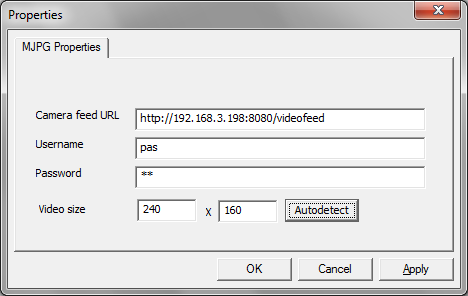
- Camera feed url option is where the program will get the video from. It may be a Movie JPEG stream or a URL to get JPEG, PNG or BMP frames. You can even serve static files, using a URL like file:///C:/name_of_file.bmp URL. Supported protocols are: HTTP, FTP, TFTP, TELNET, FILE.
- IP Webcam users enter http://phone_ip_address:port_name/videofeed there.
- Users for other camera brands can find their model at iSpy Camera Database (external website).
- Username and Password are the username and password that will be used for the server connection.
- Video size is the resolution of the virtual camera. When this setting is different from feed resolution, image will be cropped or padded with borders. Use the Autodetect button to detect it from video stream, also checking if the camera is accessible.
- Note: Applications using the camera must be restarted for resolution changes to take effect.
- Note: Some versions of ESET NOD32 are known to break the MJPG feed. If you run into this issue, disable Web Protection in NOD32->Setup->Antivirus and antispyware.
Using the virtual camera
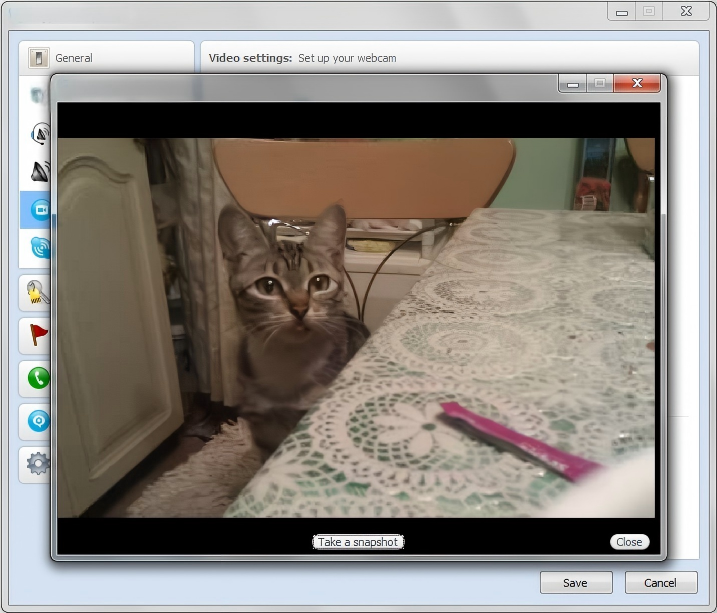
If everything works fine, the camera will be available in Windows software. If something is wrong, please check your firewall rules and your network by visiting your network camera in a web browser. If it does not help, contact us at support@ipcameraadapterapp.com.
License
If you find this software useful, or use it for commercial purposes, please consider donating.
IP Camera Adapter
 Copyright (c) 2026 Taktwo Beta Labs, <support@ipcameraadapterapp.com>

 Permission is hereby granted, free of charge, to any person obtaining a copy
 of this software and associated documentation files (the "Software"), to deal
 in the Software without restriction, including without limitation the rights
 to use, copy, modify, merge, publish, distribute, sublicense, and/or sell
 copies of the Software, and to permit persons to whom the Software is
 furnished to do so, subject to the following conditions:

 The above copyright notice and this permission notice shall be included in
 all copies or substantial portions of the Software.

 THE SOFTWARE IS PROVIDED "AS IS", WITHOUT WARRANTY OF ANY KIND, EXPRESS OR
 IMPLIED, INCLUDING BUT NOT LIMITED TO THE WARRANTIES OF MERCHANTABILITY,
 FITNESS FOR A PARTICULAR PURPOSE AND NONINFRINGEMENT. IN NO EVENT SHALL THE
 AUTHORS OR COPYRIGHT HOLDERS BE LIABLE FOR ANY CLAIM, DAMAGES OR OTHER
 LIABILITY, WHETHER IN AN ACTION OF CONTRACT, TORT OR OTHERWISE, ARISING FROM,
 OUT OF OR IN CONNECTION WITH THE SOFTWARE OR THE USE OR OTHER DEALINGS IN
 THE SOFTWARE.
This application uses the CURL and FreeImage libraries, which are distributed under their respective open-source licenses.